Ok, apparently only the ‘car’ is working on my local server; the HGV is failing. But the car shows the issue.
Using the online server, the bike will take the mountain road:
curl -X POST "https://api.openrouteservice.org/v2/directions/cycling-mountain/gpx" -H "Content-Type: application/json; charset=utf-8" -H "Accept: application/json, application/geo+json, application/gpx+xml, img/png; charset=utf-8" -H "Authorization: key" -d "{""coordinates"":[[-106.547805,35.31302],[-106.365579,35.164889]],""extra_info"":[""steepness"",""suitability"",""surface"",""waycategory"",""waytype"",""traildifficulty"",""osmid"",""roadaccessrestrictions""],""language"":""en"",""preference"":""shortest""}"
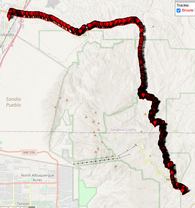
Using my local server, using the car, recommend path:
curl -X POST "http://localhost:8095/ors/v2/directions/driving-car/gpx" -H "Content-Type: application/json; charset=utf-8" -H "Accept: application/json, application/geo+json, application/gpx+xml, img/png; charset=utf-8" -d "{""coordinates"":[[-106.547805,35.31302],[-106.365579,35.164889]],""extra_info"":[""steepness"",""suitability"",""surface"",""waycategory"",""waytype"",""traildifficulty"",""osmid"",""roadaccessrestrictions""],""language"":""en"",""preference"":""recommended""}"
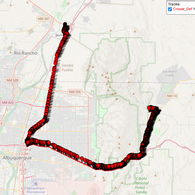
If I switch to shortest path:
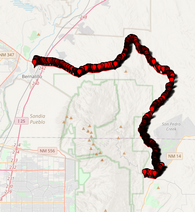
Notice that it did not follow the bike up 165 over the mountain, but instead turns left onto Tecolote, as previously described
So I then placed a few points up 165 to try to force it:
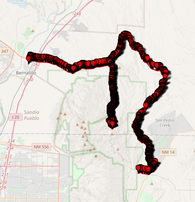
Notice it went up 165, then back down, and then jumps back onto Tecolote.
So I would like to understand how to modify the configuration to allow cars and HGV’s to go over the pass.
Additionally, you said there is a ‘barrier:gate’ on the route.
Where/how do I find that info?
Thanks