After the 9.10 => 10.0 migration on my W11 pc, during the server start I obtain the error:
C:\OpenrouteServices>C:/“Program Files”/Java/jdk-21.0.6.7/bin/java -jar ors.jar C:/OpenrouteServices/ors-config.yml
Exception in thread “main” java.lang.UnsupportedClassVersionError: org/heigit/ors/api/Application has been compiled by a more recent version of the Java Runtime (class file version 69.0), this version of the Java Runtime only recognizes class file versions up to 65.0
What it means? I must change my java installation or it exists the possibility to start mx local ORS with a dedicated JVM?
it is not clear for me. What it means ‘..and/or run this with jdk 25’? Can I run the ORS with jdk25 without updating my installation? How? Otherwise ‘and/or’ is not correct, but it is only ‘and’…
I’d assume that there is probably about a dozen different options of installing java on windows as well as probably the possibility of running multiple different versions in parallel.
There is also a few different options to run the openrouteservice - including running it from docker, so yeah, you could run the openrouteservice using java 25 without "updating your installation ", I guess.
I also addume though, that updating to java 25 might be the easiest
I installed Temurin JDK 25.0.4.1 and now my ors.jar starts, but I have immediatly the error:
2026-09-25 10:55:24 DEBUG [o.h.o.r.RoutingProfileManager ] - java.util.concurrent.ExecutionException: java.lang.RuntimeException: Could not parse OSM file: C:\OpenrouteServices\maps\nord-ovest-italy.osm.pbf
Obviously the pbf’s path is correct. May be I need a newer release of this file?
In general, the openrouteservice should work with all pbf-files, but yes, re-downloading is a good way, especially to make sure that the pbf is not corrupted or anything
2026-09-25 11:24:45 INFO [o.h.o.r.g.e.ORSGraphHopper ] - start creating graph from maps\nord-ovest-italy.osm.pbf
but then I have the parsing error on the same file… May be something is changed on your code about the parsing? Have you a simple (and sure) pbf file to check?
I can reproduce the issue with nord-ovest-260924.osm.pbf and also with nord-est-260924.osm.pbf
Looking deeper into logs showed that the issue seems to be related to elevation data that is needed during graph building. If the required data for your geographic region is not present in your elevation directory, the application tries to download the data from a data source in the internet (https://srtm.csi.cgiar.org) and this data source seems to be unavailable. In my experience, it sometime happens that an elevation provider is temporarily unavailable.
When I set
ors:
    engine:
        elevation:
            provider: cigar
or
ors:
    engine:
        elevation:
            provider: srtm
it seems to work.
Another, maybe better solution you could also try: If you know where your previous ors instances have cached the geotiff files, copy the files into your new elevation folder or just configure or link the old elevation folder to your new installation. Then, the files should hopefully not be downloaded again. Techically, the elevation data are geotiff files with extension `tif` or `gh`. Maybe, the reason why @andrzej had no issue was, that he already had the tiffs for italy in his elevation folder…?
Please let us know if one of the approaches worked for you.
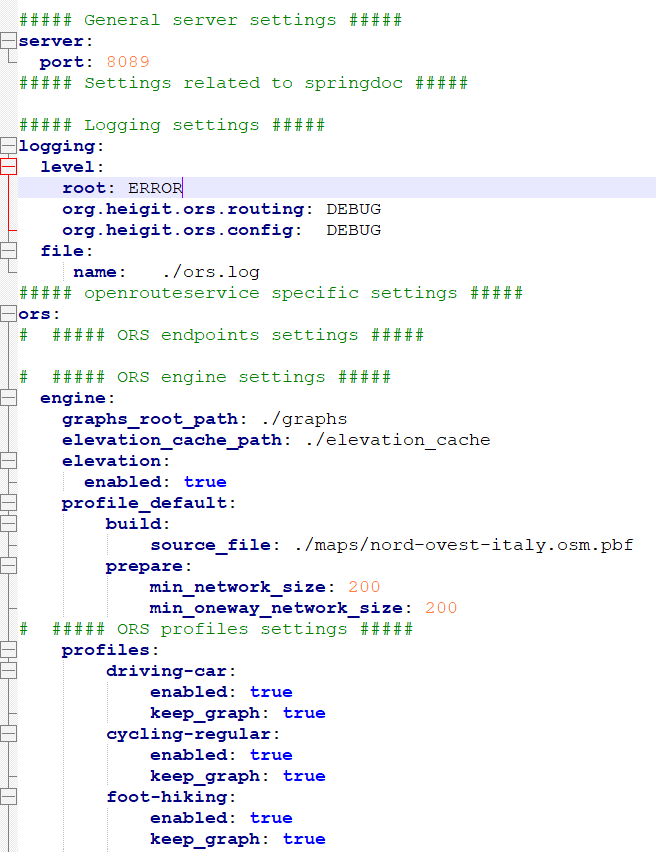
And one more hint - it is not directly related to your issue, but please let me tell you that your config is very outdated! It seems to work anyway because the values you used for non-existing config properties are just the internal defaults. This is your fixed config for the current version 10.0.1 with some hints:
server:
  port: 8089
logging:
  level:
    root: ERROR
    org.heigit.ors.routing: DEBUG
    org.heigit.ors.config: DEBUG
  file:
    name: ./ors.log
ors:
  engine:
    profile_default:
      graph_path: ./graphs # this is the default
      build:
        source_file: ./maps/nord-ovest-italy.osm.pbf
        preparation:
          min_network_size: 200 # this is the default
          #min_oneway_network_size: 200 does not exist
        elevation: true # instead of your ors.engine.elevation.enabled. true is default
    elevation:
      cache_path: ./elevation_cache # this is the default
    profiles:
      driving-car:
        enabled: true
        #keep_graph: true # does not exist. keeping the graph is default
      cycling-regular:
        enabled: true
        #keep_graph: true # does not exist. keeping the graph is default
      foot-hiking:
        enabled: true
        #keep_graph: true # does not exist. keeping the graph is default
When I remove the lines where your configuration value was just the internal default, you end up with this short config:
thanks for your answers. I don’t understand, but this morning without any change into the jar and yml file.. the rebuild worked fine, with the same nord-ovest pbf file… Why? Anyway then I followed the jhaeus’s suggests and I updated my setting file (only I leaved elevation into build section to remember the correct position). I cleaned and rebuilt all and again all worked fine… I don’ t understand what is happened, in the last day nothing is changed on my pc and on my ors files…
Anyway MANY thanks for your valuable advice. I think we can consider this issue as resolved!